
Warp Hub
The daily app for your agents, and the leaders who coach them.
Hire in Warp Recruit. Then Warp Hub takes over: onboarding steps, a one-tap activity log, team boards, and a list of who needs you. It is the part of building an agency that starts after the hire.
Starting a hub is free while the Hub is in beta. Every Warp Recruit agency plan includes a Team Hub with 5 agent seats.
Screens show a sample hub with fictional agents. No customer’s numbers appear on this page.
From pre-licensed to producing, in the order it happens.
The Hub is built around the stages an independent agent actually moves through. Each agent sees their next step, and the Activity, Stats and Team screens open once they can produce.
- 01
Pre-licensed
- 02
Exam booked
- 03
Licensed
- 04
Contracted
- 05
Producing
What your agents and owners actually see.
These are the real screens, from a sample hub. Your own hub carries your agency’s name at the top.
For new agents
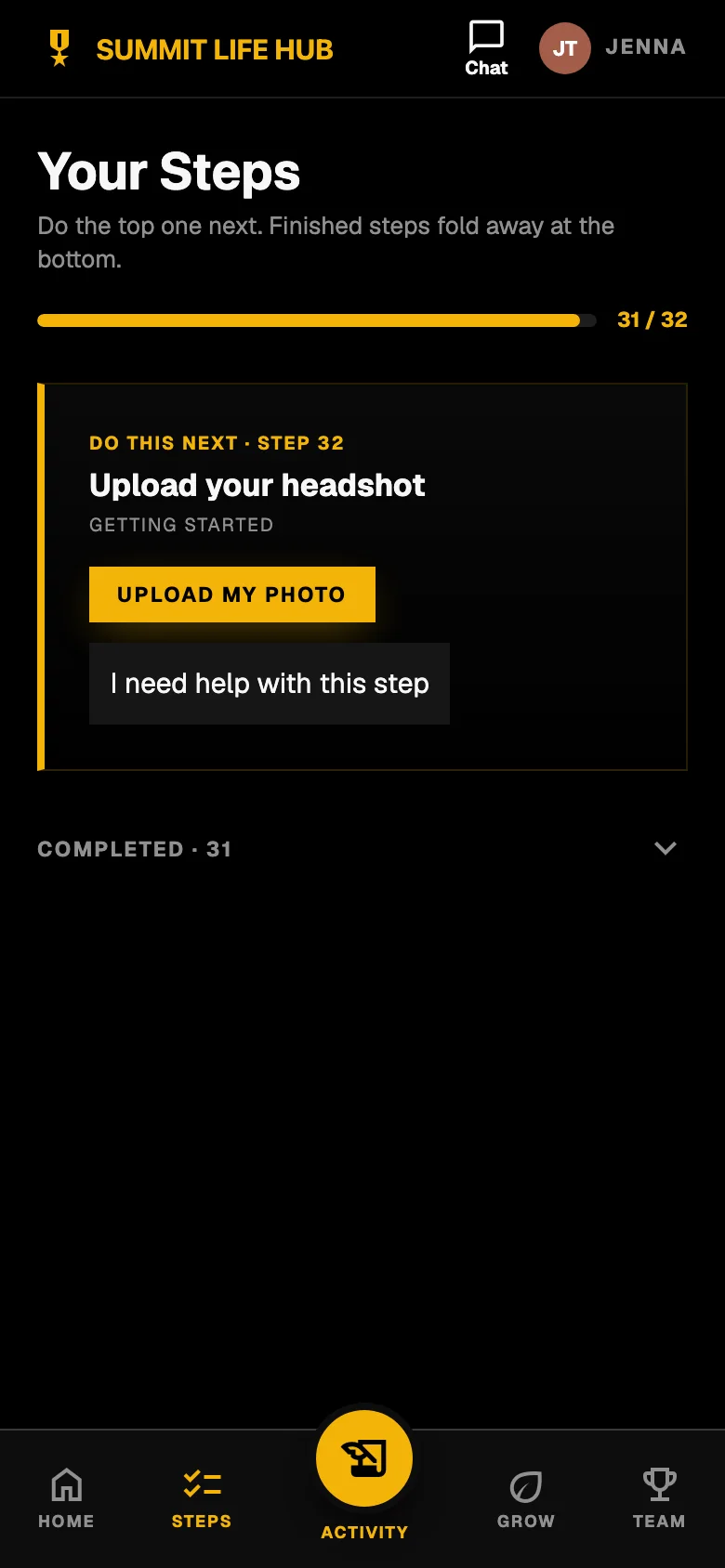
One next step. Always.
A new agent should never wonder what to do first. The Hub shows the top step on your list and hides the rest until it is done.
- Your own activation steps, in your own order, edited by you.
- Finished steps fold away. Progress is one bar.
- A stuck agent taps “I need help with this step” instead of going quiet.
One next step For every agent
Log the day in a tap.
Dials, contacts, appointments and applications, counted as the agent works. Built for a phone in one hand, with keyboard shortcuts on a desktop.
- A live tally: tap anywhere to count a dial, one tap each for a contact or an appointment.
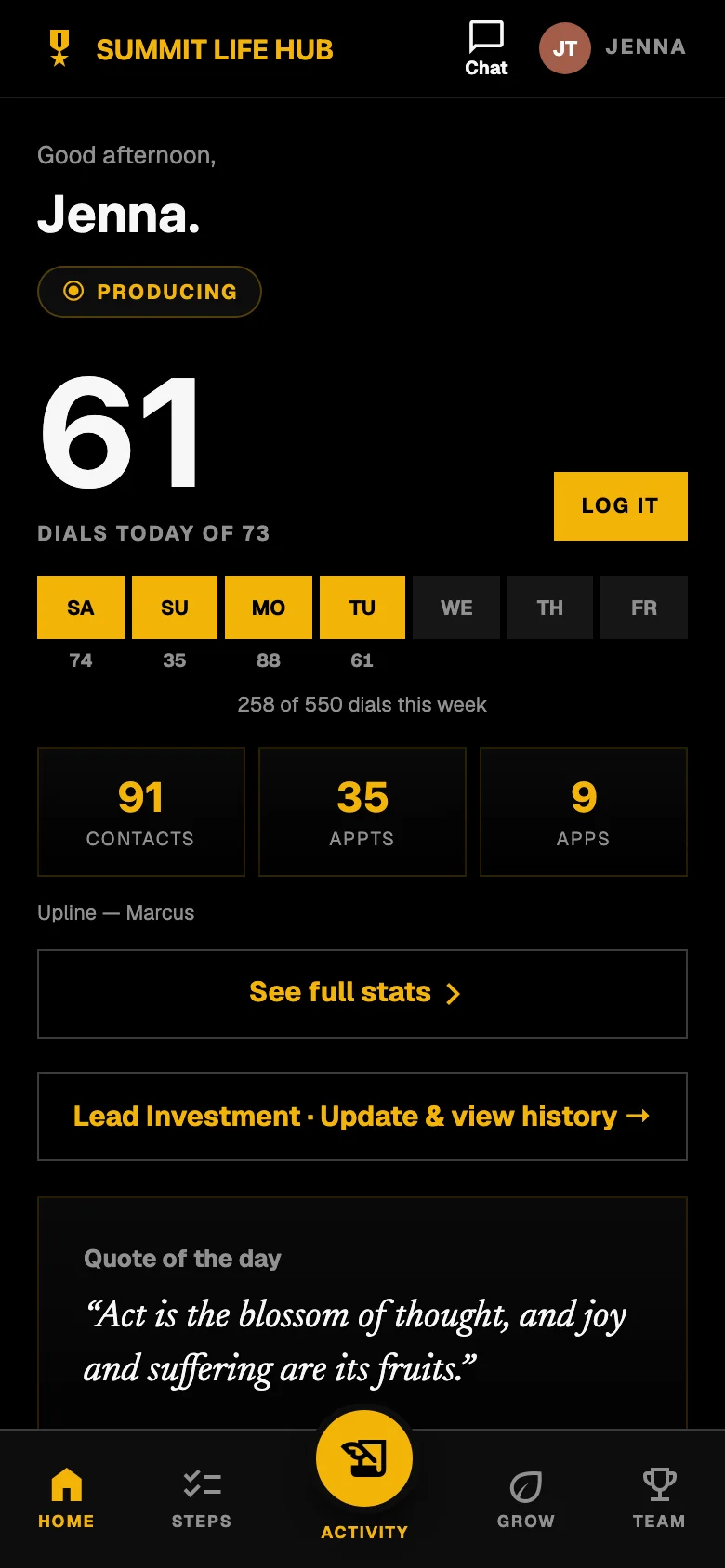
- A week strip against a dial goal, so the day-to-day picture is one glance.
- Undo is always there. Nothing needs a client’s name.
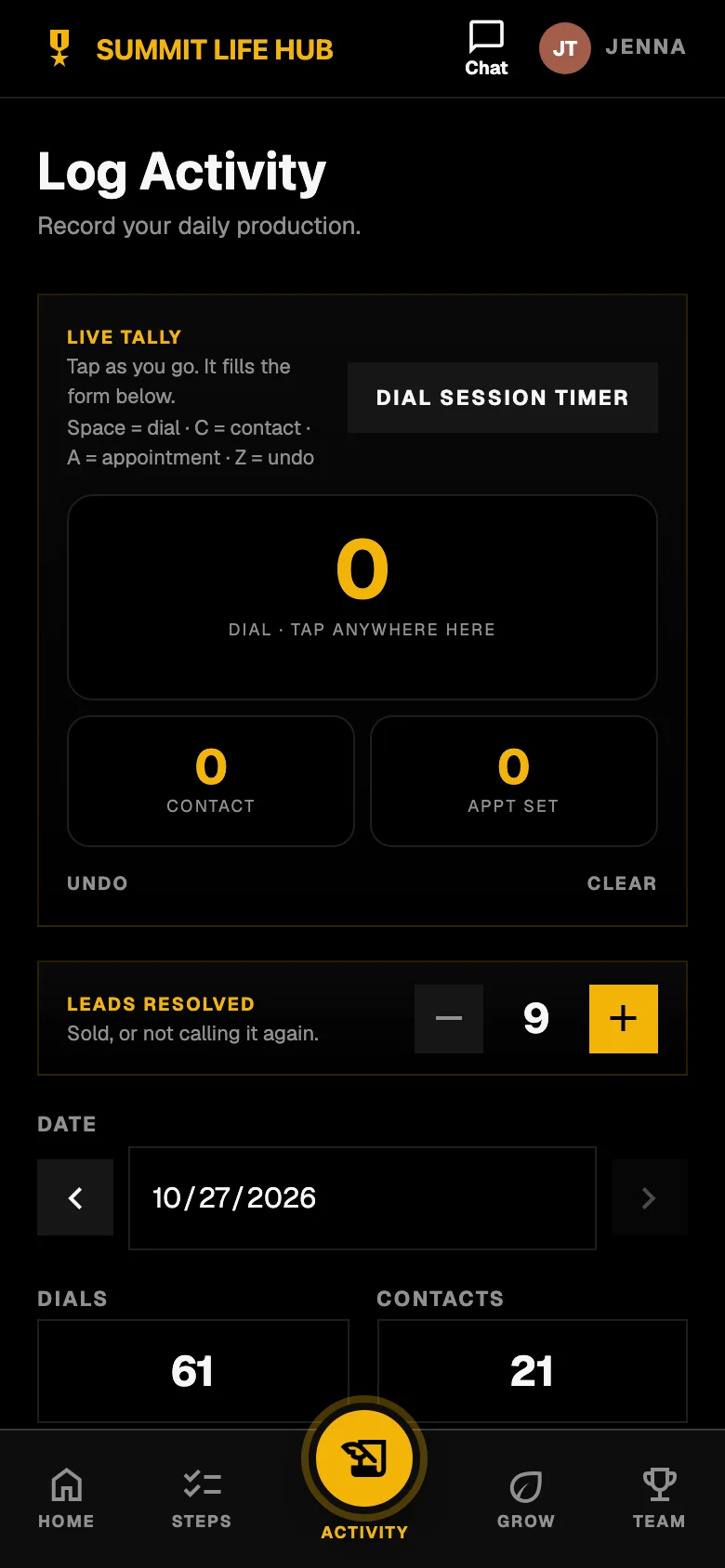
One-tap activity log Today at a glance For the team
Everyone sees where the team stands.
Team totals for the week and a board agents can climb. Badges mark hustle, closing and dials.
- Week, month and all-time boards.
- Badge leaders for hustle, top closer and dial champion.
- Owners see the same numbers rolled up by team.
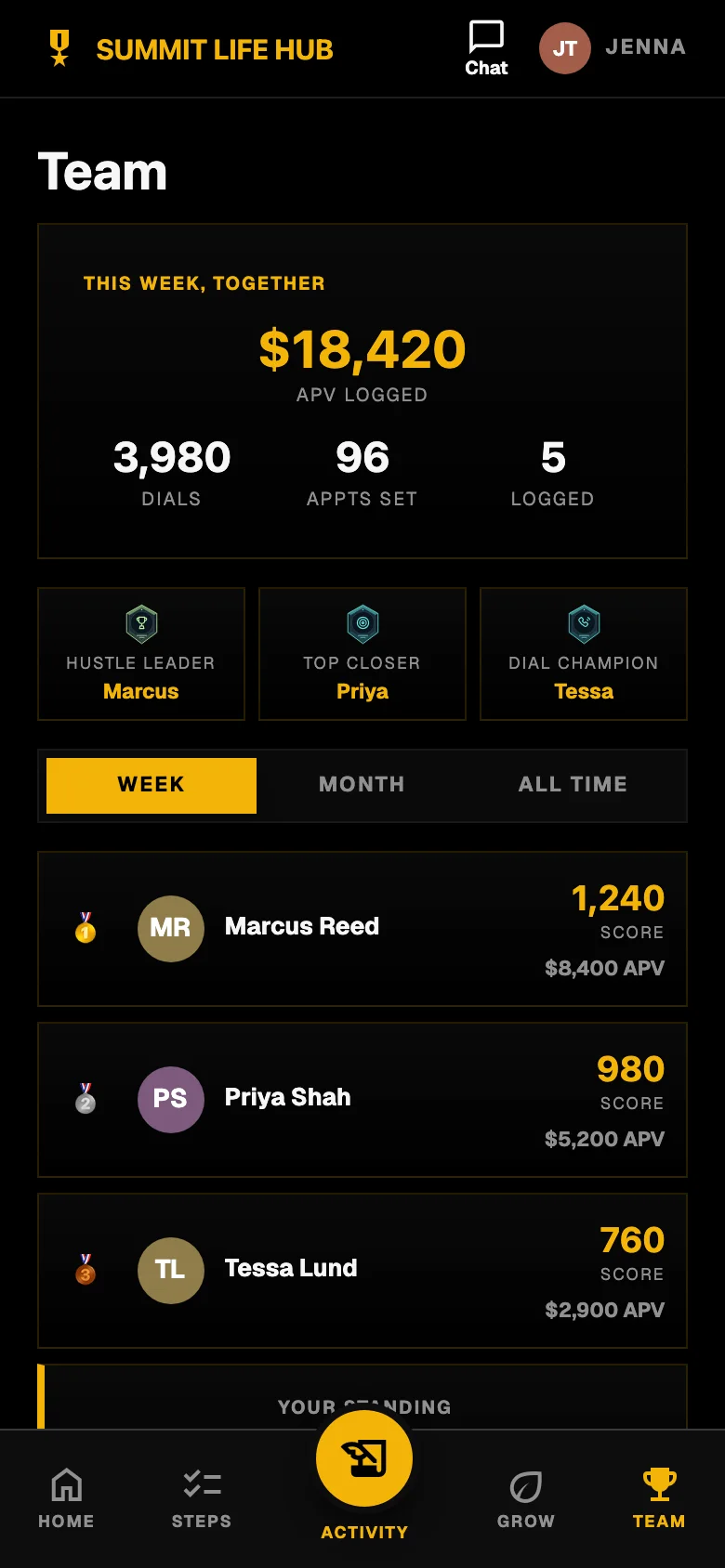
Team board For owners
See who needs you, worst first.
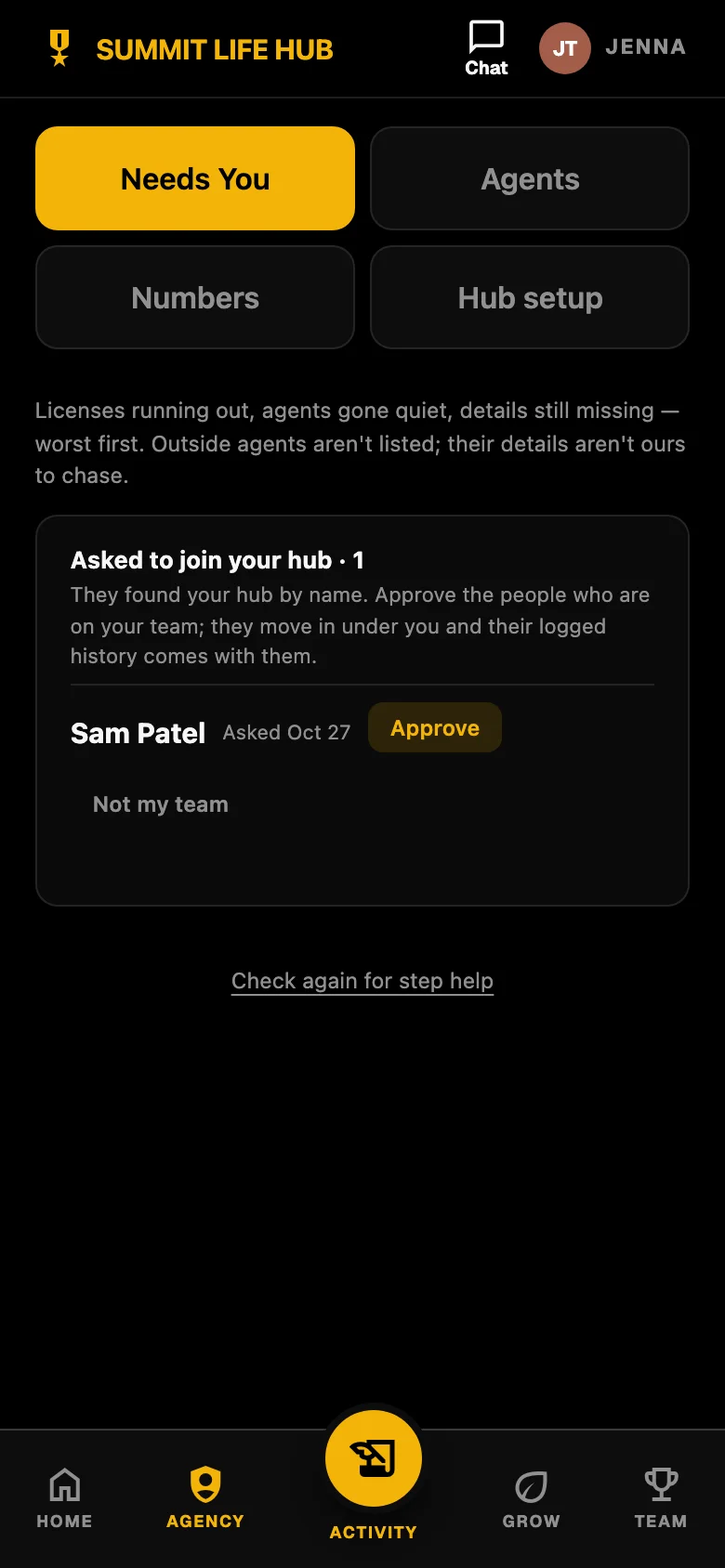
A list of the people to call today: agents who have gone quiet, licenses running out, details still missing, and people asking to join your hub.
- Approve people who find your hub by name, or send your team link.
- Numbers for every agent, and for every hub below yours, in one total.
- A tab to edit your hub’s name, steps, links and documents.
Needs You, for owners For the person behind the numbers
A private place to think.
Agents keep a journal and a reading list that nobody else can open, not their owner, not their upline, not their team. Follow-up reminders are private too.
- A journal for wins and concerns, readable only by the agent.
- Private reminders to call someone back, kept to a first name and a few words.
- A daily quote and a reading shelf.
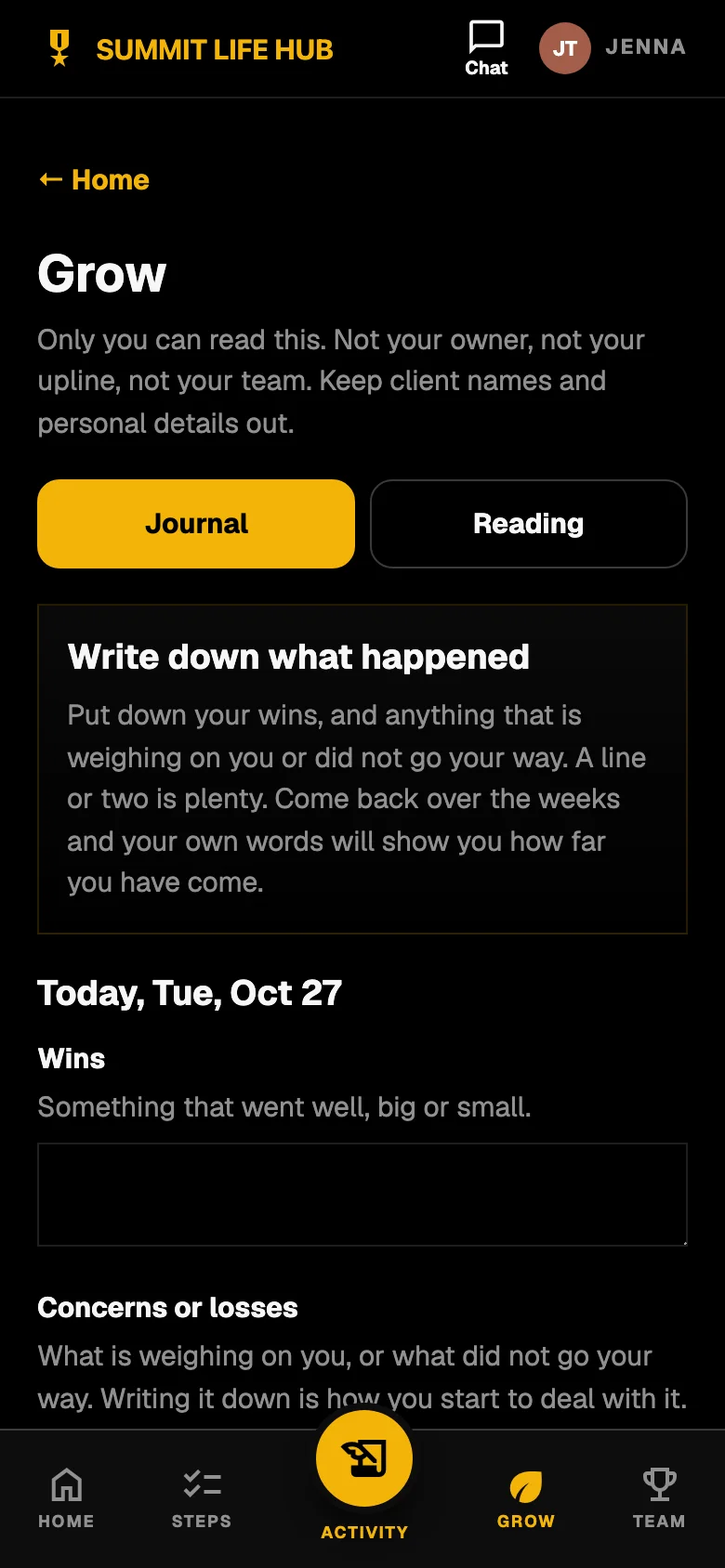
A private journal
Built so a team can become several teams.
Agencies split. Leaders grow their own. The Hub follows the structure you actually have instead of making you rebuild it.
Move a team to its own hub
When a leader is ready to run their own, an owner moves them and everyone under them into a new hub. Uplines stay as they were, and the new hub sits under the old one.
Neighboring hubs connect
Owners of hubs next to each other can see each other’s name and message each other. They never see each other’s numbers.
Find-your-hub joining
Agents can find your hub by name if you list it, or follow your team link. You approve each person, and their logged history moves in with them.
Running a team of 100 or more agents? We’ll build a plan around your size.
What the Hub is not
- It is not a commission or hierarchy-payout system. It runs on the numbers your agents log themselves and does not read carrier statements.
- It does not promise production. It shows what was logged and who needs a call; what an agent writes depends on the agent and their market.
- It is for independent agents. Client names and personal details are never entered.
Self-reported numbers work when an owner makes the habit part of how the team runs. The Hub makes that habit easy to keep. It cannot make anyone keep it.
The short list
One next step
New agents work through your own activation steps one at a time: licensing, the exam, contracting, first dials.
A one-tap activity log
Dials, contacts, appointments and applications, tallied as they work. Built for a phone held in one hand.
Team and downline numbers
Owners see every agent, and every hub below theirs, in one total. No spreadsheet, no chasing.
A Needs You list
Who has gone quiet, whose license is running out, who asked to join. Worst first.
Room to grow
Move a leader and their team into a hub of their own. Neighboring hubs can connect and message each other. Numbers stay private.
Boards, badges, a private journal
Leaderboards and badges keep the habit going. Follow-up reminders and the journal stay private to the agent.
Questions about the Hub
- What is Warp Hub?
- Warp Hub is the app independent insurance agents use every day after they are hired. New agents follow your onboarding steps from pre-licensed to producing. Licensed agents log dials, contacts, appointments and applications with a one-tap tally and see the team board. Owners see who needs them, and the numbers for every agent and every hub below theirs.
- How is Warp Hub different from Warp Recruit?
- Warp Recruit gets people to apply: your careers site, job boards and AI assistants, and one pipeline for every applicant. Warp Hub starts after the hire. They are separate apps with separate sign-ins, built to be used together: hire in Warp Recruit, ramp and track in the Hub.
- Does the Hub replace our commission tracking or our IMO’s back office?
- No. The Hub runs on activity numbers your agents log themselves. It does not read carrier statements or work out commissions, so keep using whatever your agency or IMO already provides for that. What it adds is the part those tools skip: getting a recruit from pre-licensed to producing, and the daily habit after that.
- What does the Hub cost?
- Every Warp Recruit agency plan includes a Team Hub with 5 agent seats. Running a team of 100 or more agents? We’ll build a plan around your size. The Hub is also free to try while it is in beta; we will say so plainly, well before anything is charged.
- Who can see an agent’s numbers?
- Agents on a team see the team totals and the board. Leaders can see the logs of the agents beneath them, so they can coach. No other agent sees your daily entries, notes, lead spend or goals. Owners of neighboring hubs can message each other but never see each other’s numbers. Client names and personal details are never entered; the one exception is a first name in a private follow-up reminder that only the agent can see.
- Does it work on a phone?
- Yes. It is a web app that installs to the home screen on iPhone and Android, and it also runs in a desktop browser.
- Can our agency’s name be on it?
- Yes. Each hub carries your agency’s name at the top, and you edit your own onboarding steps, links and documents.
- Can a leader take their team into a hub of their own?
- Yes. An owner can move a leader and everyone under them into a new hub. Everyone’s upline stays as it was, and the new hub sits under the old one, so the structure is not lost.
Build the team. Then keep it moving.
Founding access is invite-only while we set up agencies by hand. Tell us about yours and we will set up Warp Recruit and your Hub together.